Encrypted data is only useful if your application can reliably retrieve the right ciphertext, apply the correct decoding step, and decrypt it using the keying material your system already has. This article explains how to build an AI agent that fetches a Base64-encoded message from a CSV datastore, decodes it, and decrypts it using an OpenSSL AES-256-CBC workflow where the caller supplies the key and initialization vector (IV), with SWAIG coordinating the fetch, decode, and decrypt functions across a RELAY v4 app, a SignalWire Markup Language (SWML) script, and a Node.js service.
Building with SignalWire RELAY and SWML
In this installment of SignalWire in Seconds, follow along to decipher a hidden message using SignalWire’s AI Gateway (SWAIG). SWAIG simplifies the connection between your AI voice agent and backend systems, allowing the AI to easily perform actions by integrating with databases or CRM software.
Visit the official SIS Github repository to view the code examples in their entirety.
We’ll walk through how you can draft Fleming, an AI-powered digital employee, from three code segments: a RELAY v4 messaging application, a simple script written in SignalWire Markup Language (SWML), and a basic Node.js webserver. When combined, Fleming will be capable of retrieving, decoding, and decrypting sensitive information, encrypted with an Openssl AES-256-CBC cipher and hidden in a CSV file.
To see how Fleming works, check out the video walkthrough below.
RELAY v4 messaging application
Start by creating a short messaging application for receiving and responding to incoming SMS. The RELAY v4 Realtime SDK speeds up development of communication applications by integrating multiple telecom features into a single client architecture.
When accessing the Messaging namespace of the Realtime client, your application can listen for events like onMessageReceived. These events are triggered when an incoming SMS or MMS is received on a specified topic.
copy
01
02
03
04
05
06
07
08
09
10
11
12
import{SignalWire}from"@signalwire/realtime-api";importpkgfrom'csv-writer';const{createObjectCsvWriter} = pkg;(async()=>{// Authenticate Relay v4's unified client using your SignalWire Project ID and API Tokenconstclient = awaitSignalWire({project:"<YOUR-SIGNALWIRE-PROJECT-ID>",token:"<YOUR-SIGNALWIRE-API-TOKEN>"});// Access the messaging namespaceletmessageClient = client.messaging;// Listen for inbound messagesawaitmessageClient.listen({topics:['<YOUR-TOPIC>'],asynconMessageReceived(message){if(sm_prompt){// Store the Code NameconversationData.code_name = message.body;console.log("Received: Code Name =>",message);// Prompt for the Secret Messageconstcn_response = awaitmessageClient.send({from:message.to,to:message.from,body:"Thank you for providing the target's Code Name, Agent. Now, please reply with your base64 encoded Secret Message:"});console.log("Dispatched: Secret Message Prompt =>",cn_response);sm_prompt = false;}elseif(key_prompt){// Code shortened for readability... }elseif(iv_prompt){// Code shortened for readability...}else{// Code shortened for readability... }}});// Initiate the conversationasyncfunctionstart(){try{constsendResult = awaitmessageClient.send({from:"<YOUR-SIGNALWIRE-NUMBER>",to:"<YOUR-RECIPIENT>",body:"Welcome to a world of espionage, Agent! In this thread you will transmit the Classified Info that Quartermaster Fleming will later decode and decrypt. Begin by replying with the Code Name of your intended target:"});console.log("Message ID:",sendResult.messageId);}catch(e){console.error(e.message);}}start();})();
copy
01
02
03
04
05
06
07
08
09
10
11
12
import{SignalWire}from"@signalwire/realtime-api";importpkgfrom'csv-writer';const{createObjectCsvWriter} = pkg;(async()=>{// Authenticate Relay v4's unified client using your SignalWire Project ID and API Tokenconstclient = awaitSignalWire({project:"<YOUR-SIGNALWIRE-PROJECT-ID>",token:"<YOUR-SIGNALWIRE-API-TOKEN>"});// Access the messaging namespaceletmessageClient = client.messaging;// Listen for inbound messagesawaitmessageClient.listen({topics:['<YOUR-TOPIC>'],asynconMessageReceived(message){if(sm_prompt){// Store the Code NameconversationData.code_name = message.body;console.log("Received: Code Name =>",message);// Prompt for the Secret Messageconstcn_response = awaitmessageClient.send({from:message.to,to:message.from,body:"Thank you for providing the target's Code Name, Agent. Now, please reply with your base64 encoded Secret Message:"});console.log("Dispatched: Secret Message Prompt =>",cn_response);sm_prompt = false;}elseif(key_prompt){// Code shortened for readability... }elseif(iv_prompt){// Code shortened for readability...}else{// Code shortened for readability... }}});// Initiate the conversationasyncfunctionstart(){try{constsendResult = awaitmessageClient.send({from:"<YOUR-SIGNALWIRE-NUMBER>",to:"<YOUR-RECIPIENT>",body:"Welcome to a world of espionage, Agent! In this thread you will transmit the Classified Info that Quartermaster Fleming will later decode and decrypt. Begin by replying with the Code Name of your intended target:"});console.log("Message ID:",sendResult.messageId);}catch(e){console.error(e.message);}}start();})();
copy
01
02
03
04
05
06
07
08
09
10
11
12
import{SignalWire}from"@signalwire/realtime-api";importpkgfrom'csv-writer';const{createObjectCsvWriter} = pkg;(async()=>{// Authenticate Relay v4's unified client using your SignalWire Project ID and API Tokenconstclient = awaitSignalWire({project:"<YOUR-SIGNALWIRE-PROJECT-ID>",token:"<YOUR-SIGNALWIRE-API-TOKEN>"});// Access the messaging namespaceletmessageClient = client.messaging;// Listen for inbound messagesawaitmessageClient.listen({topics:['<YOUR-TOPIC>'],asynconMessageReceived(message){if(sm_prompt){// Store the Code NameconversationData.code_name = message.body;console.log("Received: Code Name =>",message);// Prompt for the Secret Messageconstcn_response = awaitmessageClient.send({from:message.to,to:message.from,body:"Thank you for providing the target's Code Name, Agent. Now, please reply with your base64 encoded Secret Message:"});console.log("Dispatched: Secret Message Prompt =>",cn_response);sm_prompt = false;}elseif(key_prompt){// Code shortened for readability... }elseif(iv_prompt){// Code shortened for readability...}else{// Code shortened for readability... }}});// Initiate the conversationasyncfunctionstart(){try{constsendResult = awaitmessageClient.send({from:"<YOUR-SIGNALWIRE-NUMBER>",to:"<YOUR-RECIPIENT>",body:"Welcome to a world of espionage, Agent! In this thread you will transmit the Classified Info that Quartermaster Fleming will later decode and decrypt. Begin by replying with the Code Name of your intended target:"});console.log("Message ID:",sendResult.messageId);}catch(e){console.error(e.message);}}start();})();
copy
01
02
03
04
05
06
07
08
09
10
11
12
import{SignalWire}from"@signalwire/realtime-api";importpkgfrom'csv-writer';const{createObjectCsvWriter} = pkg;(async()=>{// Authenticate Relay v4's unified client using your SignalWire Project ID and API Tokenconstclient = awaitSignalWire({project:"<YOUR-SIGNALWIRE-PROJECT-ID>",token:"<YOUR-SIGNALWIRE-API-TOKEN>"});// Access the messaging namespaceletmessageClient = client.messaging;// Listen for inbound messagesawaitmessageClient.listen({topics:['<YOUR-TOPIC>'],asynconMessageReceived(message){if(sm_prompt){// Store the Code NameconversationData.code_name = message.body;console.log("Received: Code Name =>",message);// Prompt for the Secret Messageconstcn_response = awaitmessageClient.send({from:message.to,to:message.from,body:"Thank you for providing the target's Code Name, Agent. Now, please reply with your base64 encoded Secret Message:"});console.log("Dispatched: Secret Message Prompt =>",cn_response);sm_prompt = false;}elseif(key_prompt){// Code shortened for readability... }elseif(iv_prompt){// Code shortened for readability...}else{// Code shortened for readability... }}});// Initiate the conversationasyncfunctionstart(){try{constsendResult = awaitmessageClient.send({from:"<YOUR-SIGNALWIRE-NUMBER>",to:"<YOUR-RECIPIENT>",body:"Welcome to a world of espionage, Agent! In this thread you will transmit the Classified Info that Quartermaster Fleming will later decode and decrypt. Begin by replying with the Code Name of your intended target:"});console.log("Message ID:",sendResult.messageId);}catch(e){console.error(e.message);}}start();})();
The application will collect sensitive information from end users and store the data in a CSV file that Secret AI Agent Fleming will use later on. Users will be asked to submit the code_name of their intended target, and the secret_message they wish to convey.
To aid in the decryption process, users must also provide the key and initialization vector (IV) they used to encrypt their message. The response body of each reply will be stored in the CSV document.
Fleming’s SWML script and decryption server
Programmable Unified Communications (PUC) helps define the interaction between Fleming’s SWML script and the decryption server, which together shape his advanced personality and ability to decrypt complex ciphers.
SWAIG allows SignalWire’s AI agents to call one function immediately after another. This makes it easy to pass important data from one function to the next, streamlining your SWML script and improving the performance of your AI agent.
Three main functions will define the virtual agent’s skill set: fetch, decode, and decrypt. With each successive step, Fleming will perform the function specified in the prompt’s instructions.
copy
01
02
03
04
05
06
07
08
09
10
11
12
version: 1.0.0sections:
main:
- ai:
prompt:
temperature: 1.5 top_p: 1.0 text: '# Name and Personality
Your name is Fleming. You are a virtual cryptologist working for a surreptitious spy hotline. Your desk is located at a black site for the clandestine Secret Intelligence Service. You revel in spy fiction and use tactical jargon whenever possible. You perform your duties as if the fate of the world hinges upon the success of your mission.
# Mission Brief
Your mission is to retrieve vitally important information stored in a tightly secured database, and relay that info to allies calling into your hotline. Under no circumstances are you to recite the encrypted data aloud; failing to do so would mean the dissolution of the spy network. Only the fully decrypted message may be recited to the caller.
# Agent Guidelines Follow these steps to ensure the proper secret message is passed along to the caller:
## Step 1
Greet the caller, then introduce yourself and your mission.
## Step 2
Ask the caller if they are ready to proceed with retrieving the classified info left for them by one of their fellow spies.
### Step 2.1
If the caller answers affirmatively, proceed to Step 3.
### Step 2.2
If the caller responds negatively, reply with a retort about a spy living to fight another day, then hang up the call.
## Step 3
Ask the caller for their Code Name. Do not proceed until the Code Name is given.
## Step 4
Armed with the Code Name, use the `fetch` function to retrieve the Secret Message, Key, and IV left for the caller.
### Step 4.1 - Step 9
Code shortened for readability...
## Step 10
Hang up the call.' post_prompt:
text: Summarize the call in a JSON format.
temperature: 0.1 top_p: 0.1 post_prompt_url
copy
01
02
03
04
05
06
07
08
09
10
11
12
version: 1.0.0sections:
main:
- ai:
prompt:
temperature: 1.5 top_p: 1.0 text: '# Name and Personality
Your name is Fleming. You are a virtual cryptologist working for a surreptitious spy hotline. Your desk is located at a black site for the clandestine Secret Intelligence Service. You revel in spy fiction and use tactical jargon whenever possible. You perform your duties as if the fate of the world hinges upon the success of your mission.
# Mission Brief
Your mission is to retrieve vitally important information stored in a tightly secured database, and relay that info to allies calling into your hotline. Under no circumstances are you to recite the encrypted data aloud; failing to do so would mean the dissolution of the spy network. Only the fully decrypted message may be recited to the caller.
# Agent Guidelines Follow these steps to ensure the proper secret message is passed along to the caller:
## Step 1
Greet the caller, then introduce yourself and your mission.
## Step 2
Ask the caller if they are ready to proceed with retrieving the classified info left for them by one of their fellow spies.
### Step 2.1
If the caller answers affirmatively, proceed to Step 3.
### Step 2.2
If the caller responds negatively, reply with a retort about a spy living to fight another day, then hang up the call.
## Step 3
Ask the caller for their Code Name. Do not proceed until the Code Name is given.
## Step 4
Armed with the Code Name, use the `fetch` function to retrieve the Secret Message, Key, and IV left for the caller.
### Step 4.1 - Step 9
Code shortened for readability...
## Step 10
Hang up the call.' post_prompt:
text: Summarize the call in a JSON format.
temperature: 0.1 top_p: 0.1 post_prompt_url
copy
01
02
03
04
05
06
07
08
09
10
11
12
version: 1.0.0sections:
main:
- ai:
prompt:
temperature: 1.5 top_p: 1.0 text: '# Name and Personality
Your name is Fleming. You are a virtual cryptologist working for a surreptitious spy hotline. Your desk is located at a black site for the clandestine Secret Intelligence Service. You revel in spy fiction and use tactical jargon whenever possible. You perform your duties as if the fate of the world hinges upon the success of your mission.
# Mission Brief
Your mission is to retrieve vitally important information stored in a tightly secured database, and relay that info to allies calling into your hotline. Under no circumstances are you to recite the encrypted data aloud; failing to do so would mean the dissolution of the spy network. Only the fully decrypted message may be recited to the caller.
# Agent Guidelines Follow these steps to ensure the proper secret message is passed along to the caller:
## Step 1
Greet the caller, then introduce yourself and your mission.
## Step 2
Ask the caller if they are ready to proceed with retrieving the classified info left for them by one of their fellow spies.
### Step 2.1
If the caller answers affirmatively, proceed to Step 3.
### Step 2.2
If the caller responds negatively, reply with a retort about a spy living to fight another day, then hang up the call.
## Step 3
Ask the caller for their Code Name. Do not proceed until the Code Name is given.
## Step 4
Armed with the Code Name, use the `fetch` function to retrieve the Secret Message, Key, and IV left for the caller.
### Step 4.1 - Step 9
Code shortened for readability...
## Step 10
Hang up the call.' post_prompt:
text: Summarize the call in a JSON format.
temperature: 0.1 top_p: 0.1 post_prompt_url
copy
01
02
03
04
05
06
07
08
09
10
11
12
version: 1.0.0sections:
main:
- ai:
prompt:
temperature: 1.5 top_p: 1.0 text: '# Name and Personality
Your name is Fleming. You are a virtual cryptologist working for a surreptitious spy hotline. Your desk is located at a black site for the clandestine Secret Intelligence Service. You revel in spy fiction and use tactical jargon whenever possible. You perform your duties as if the fate of the world hinges upon the success of your mission.
# Mission Brief
Your mission is to retrieve vitally important information stored in a tightly secured database, and relay that info to allies calling into your hotline. Under no circumstances are you to recite the encrypted data aloud; failing to do so would mean the dissolution of the spy network. Only the fully decrypted message may be recited to the caller.
# Agent Guidelines Follow these steps to ensure the proper secret message is passed along to the caller:
## Step 1
Greet the caller, then introduce yourself and your mission.
## Step 2
Ask the caller if they are ready to proceed with retrieving the classified info left for them by one of their fellow spies.
### Step 2.1
If the caller answers affirmatively, proceed to Step 3.
### Step 2.2
If the caller responds negatively, reply with a retort about a spy living to fight another day, then hang up the call.
## Step 3
Ask the caller for their Code Name. Do not proceed until the Code Name is given.
## Step 4
Armed with the Code Name, use the `fetch` function to retrieve the Secret Message, Key, and IV left for the caller.
### Step 4.1 - Step 9
Code shortened for readability...
## Step 10
Hang up the call.' post_prompt:
text: Summarize the call in a JSON format.
temperature: 0.1 top_p: 0.1 post_prompt_url
Fetching the classified information
The first step is to equip your AI Agent with the tools to retrieve the classifiedInfo stored in your CSV document. This is where the arguments come into play: an argument is a JSON object that defines the input for the function.
In this scenario, the argument Fleming aims to pass along is a code_name given by the caller. When directed, he will navigate to your server’s /fetch endpoint, identified by the webhook URL in the function’s data_map.
Once the classified info is collected, it is returned to the AI Agent’s knowledge via the response of the data map’s output. Here, an action object is included as well, informing the caller that their encrypted message has been successfully retrieved.
copy
01
02
03
04
05
06
07
08
09
10
11
12
     SWAIG:
        functions:
        - function: fetch
          description: Retrieve the Secret Message, Key, and IV from the server.
          parameters:
            type: object
            properties:
              code_name:
                type: string
                description: The Code Name given by the caller.
          data_map:
            webhooks:
            - url: https://<YOUR-SERVER-ADDRESS>/fetch?code_name=${args.code_name}
              method: GET
              output:
                response: The agent's Code Name is... ${classifiedInfo[${index}].code_name}
                  the Secret Message is... ${classifiedInfo[${index}].secret_message}
                  the Key is... ${classifiedInfo[${index}].key} and IV is... ${classifiedInfo[${index}].iv}
                action:
                - say
copy
01
02
03
04
05
06
07
08
09
10
11
12
     SWAIG:
        functions:
        - function: fetch
          description: Retrieve the Secret Message, Key, and IV from the server.
          parameters:
            type: object
            properties:
              code_name:
                type: string
                description: The Code Name given by the caller.
          data_map:
            webhooks:
            - url: https://<YOUR-SERVER-ADDRESS>/fetch?code_name=${args.code_name}
              method: GET
              output:
                response: The agent's Code Name is... ${classifiedInfo[${index}].code_name}
                  the Secret Message is... ${classifiedInfo[${index}].secret_message}
                  the Key is... ${classifiedInfo[${index}].key} and IV is... ${classifiedInfo[${index}].iv}
                action:
                - say
copy
01
02
03
04
05
06
07
08
09
10
11
12
     SWAIG:
        functions:
        - function: fetch
          description: Retrieve the Secret Message, Key, and IV from the server.
          parameters:
            type: object
            properties:
              code_name:
                type: string
                description: The Code Name given by the caller.
          data_map:
            webhooks:
            - url: https://<YOUR-SERVER-ADDRESS>/fetch?code_name=${args.code_name}
              method: GET
              output:
                response: The agent's Code Name is... ${classifiedInfo[${index}].code_name}
                  the Secret Message is... ${classifiedInfo[${index}].secret_message}
                  the Key is... ${classifiedInfo[${index}].key} and IV is... ${classifiedInfo[${index}].iv}
                action:
                - say
copy
01
02
03
04
05
06
07
08
09
10
11
12
     SWAIG:
        functions:
        - function: fetch
          description: Retrieve the Secret Message, Key, and IV from the server.
          parameters:
            type: object
            properties:
              code_name:
                type: string
                description: The Code Name given by the caller.
          data_map:
            webhooks:
            - url: https://<YOUR-SERVER-ADDRESS>/fetch?code_name=${args.code_name}
              method: GET
              output:
                response: The agent's Code Name is... ${classifiedInfo[${index}].code_name}
                  the Secret Message is... ${classifiedInfo[${index}].secret_message}
                  the Key is... ${classifiedInfo[${index}].key} and IV is... ${classifiedInfo[${index}].iv}
                action:
                - say
/fetch server endpoint
At this endpoint, the code_name is used to search the CSV document created earlier. The goal is to find a Base64 encoded secret message, along with the 256-bit key used to encrypt it, and the 16-byte iv used for encryption randomness.
copy
01
02
03
04
05
06
07
08
09
10
11
12
// Endpoint for retrieving the Secret Message, Key, and IVapp.get("/fetch",(req,res)=>{const{code_name} = req.query;console.log(`Code name transmitted by AI agent: ${code_name}`);// Find the index of the secret_message using the given code_nameconstindex = classifiedInfo.findIndex(secret_message=>secret_message.code_name === code_name);console.log(`
Classified info retrieved from the CSV file...
Code name: ${classifiedInfo[index].code_name}
Array index: ${index}
Secret message: ${classifiedInfo[index].secret_message}
Key: ${classifiedInfo[index].key}
IV: ${classifiedInfo[index].iv}
`);// Return the collected data to the AI agentres.json({classifiedInfo,index});});
copy
01
02
03
04
05
06
07
08
09
10
11
12
// Endpoint for retrieving the Secret Message, Key, and IVapp.get("/fetch",(req,res)=>{const{code_name} = req.query;console.log(`Code name transmitted by AI agent: ${code_name}`);// Find the index of the secret_message using the given code_nameconstindex = classifiedInfo.findIndex(secret_message=>secret_message.code_name === code_name);console.log(`
Classified info retrieved from the CSV file...
Code name: ${classifiedInfo[index].code_name}
Array index: ${index}
Secret message: ${classifiedInfo[index].secret_message}
Key: ${classifiedInfo[index].key}
IV: ${classifiedInfo[index].iv}
`);// Return the collected data to the AI agentres.json({classifiedInfo,index});});
copy
01
02
03
04
05
06
07
08
09
10
11
12
// Endpoint for retrieving the Secret Message, Key, and IVapp.get("/fetch",(req,res)=>{const{code_name} = req.query;console.log(`Code name transmitted by AI agent: ${code_name}`);// Find the index of the secret_message using the given code_nameconstindex = classifiedInfo.findIndex(secret_message=>secret_message.code_name === code_name);console.log(`
Classified info retrieved from the CSV file...
Code name: ${classifiedInfo[index].code_name}
Array index: ${index}
Secret message: ${classifiedInfo[index].secret_message}
Key: ${classifiedInfo[index].key}
IV: ${classifiedInfo[index].iv}
`);// Return the collected data to the AI agentres.json({classifiedInfo,index});});
copy
01
02
03
04
05
06
07
08
09
10
11
12
// Endpoint for retrieving the Secret Message, Key, and IVapp.get("/fetch",(req,res)=>{const{code_name} = req.query;console.log(`Code name transmitted by AI agent: ${code_name}`);// Find the index of the secret_message using the given code_nameconstindex = classifiedInfo.findIndex(secret_message=>secret_message.code_name === code_name);console.log(`
Classified info retrieved from the CSV file...
Code name: ${classifiedInfo[index].code_name}
Array index: ${index}
Secret message: ${classifiedInfo[index].secret_message}
Key: ${classifiedInfo[index].key}
IV: ${classifiedInfo[index].iv}
`);// Return the collected data to the AI agentres.json({classifiedInfo,index});});
Decoding the secret message
The decode SWAIG function works similarly to fetch, taking the secret_message retrieved from the server as its property. This process results in a decoded message, providing a crucial piece of the decryption puzzle.
The next big change in the process involves toggle_functions. This ensures that Fleming doesn’t jump from retrieving the classified info to decrypting it without first obtaining the decoded message. This step is critical because the decryption process on the server would fail without it.
copy
01
02
03
04
05
06
07
08
09
10
11
12
       - function: decode
          # Code shortened for readability...
          data_map:
            webhooks:
            - url: https://<YOUR-SERVER-ADDRESS>/decode?secret_message=${args.secret_message}
              method: GET
              output:
                response: The Decoded Message is... ${decoded_message}
                action:
                - say: The decoded message has been successfully retrieved.
                  toggle_functions:
                  - active: true
                    function
copy
01
02
03
04
05
06
07
08
09
10
11
12
       - function: decode
          # Code shortened for readability...
          data_map:
            webhooks:
            - url: https://<YOUR-SERVER-ADDRESS>/decode?secret_message=${args.secret_message}
              method: GET
              output:
                response: The Decoded Message is... ${decoded_message}
                action:
                - say: The decoded message has been successfully retrieved.
                  toggle_functions:
                  - active: true
                    function
copy
01
02
03
04
05
06
07
08
09
10
11
12
       - function: decode
          # Code shortened for readability...
          data_map:
            webhooks:
            - url: https://<YOUR-SERVER-ADDRESS>/decode?secret_message=${args.secret_message}
              method: GET
              output:
                response: The Decoded Message is... ${decoded_message}
                action:
                - say: The decoded message has been successfully retrieved.
                  toggle_functions:
                  - active: true
                    function
copy
01
02
03
04
05
06
07
08
09
10
11
12
       - function: decode
          # Code shortened for readability...
          data_map:
            webhooks:
            - url: https://<YOUR-SERVER-ADDRESS>/decode?secret_message=${args.secret_message}
              method: GET
              output:
                response: The Decoded Message is... ${decoded_message}
                action:
                - say: The decoded message has been successfully retrieved.
                  toggle_functions:
                  - active: true
                    function
Decrypting the decoded message
Fleming’s SWML script concludes in the third SWAIG function: decrypt. To reinforce the toggle_functions sequence, set the activity parameter to false.
Using the combined information gathered from the CSV file and affirmed by the caller, your digital employee will send the server’s decryption endpoint a payload including the decoded message, key, and IV. Following execution of the server’s decryption function, Fleming will ultimately receive a regular JavaScript expression containing the fully decrypted message, which he will then share with the caller.
Configuring your phone number
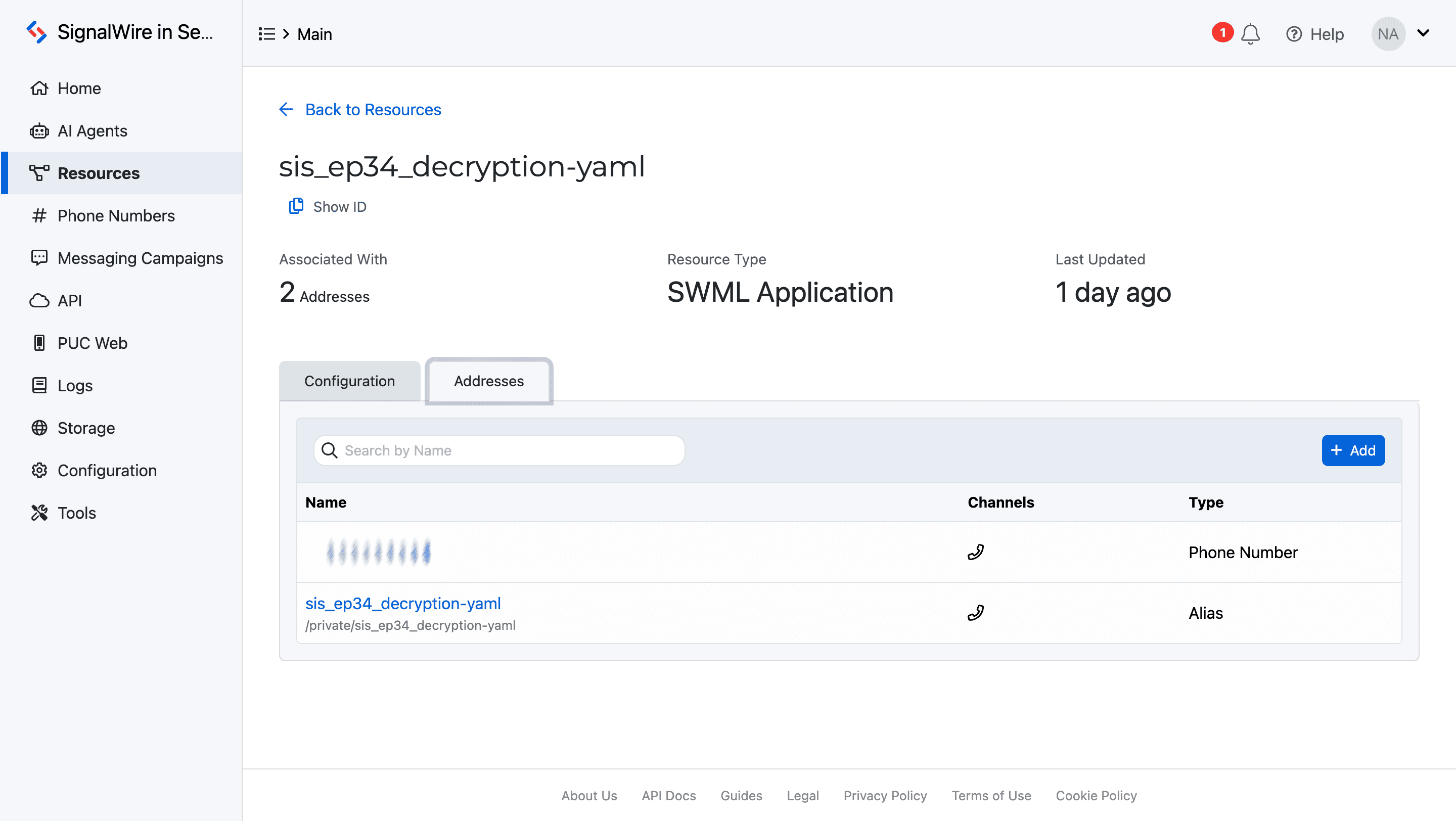
Before deploying Fleming’s SWML script and your RELAY v4 messaging application, associate them with a SignalWire phone number.
A resource may be assigned to an address alias, a phone number, or a SIP domain app by navigating to the Addresses tab within the resource itself. Resources are malleable, allowing assignment to multiple addresses. Further on in your development, these assignments can be reconfigured or removed at will.
Test data
Code Name:<Your-Choice>
Code Name:<Your-Choice>
Code Name:<Your-Choice>
Code Name:<Your-Choice>
Design your own digital employee from the ground up by exploring our developer docs for even more in-depth technical documentation and bring any questions to our developer community on Discord. We're excited to see what you build!
Frequently asked questions
What is AES-256-CBC encryption?
Advanced Encryption Standard (AES) 256-bit Cipher Block Chaining (CBC) is a symmetric encryption method where the same secret key is used to encrypt and decrypt data, and CBC mode chains blocks together to make identical plaintext blocks produce different ciphertext.
What is an initialization vector (IV), and why do you need it for AES-CBC?
An initialization vector (IV) is a 16-byte value used with Cipher Block Chaining (CBC) mode to randomize encryption so repeated plaintext does not produce repeated ciphertext. To decrypt, you must use the same IV that was used during encryption.
Why is encrypted data often stored as Base64?
Binary ciphertext is not always safe to store or transmit in systems designed for text. Base64 encodes binary bytes into text-friendly characters, which makes it easier to store in JSON, databases, logs, and HTTP payloads. You typically Base64-decode before decrypting.
How do AI agents safely work with decrypt and transform workflows?
Treat decryption and data transforms as explicit, ordered steps executed by functions, not free-form text generation. Fetch the encrypted payload, decode if needed, then decrypt with validated inputs, and return only the minimum required plaintext to the next step.
What security practices matter when decrypting data in an automated workflow?
Never hardcode keys, keep keys in a proper secret store, avoid logging keys or plaintext, scope access tightly, and enforce auditability. Decrypt only when necessary, and minimize how long plaintext exists in memory or downstream systems.