Article
18 min
read
What Is Session Initiation Protocol (SIP)?
Learn the history, benefits, and how to add SIP to your SignalWire arsenal.

SignalWire


Session Initiation Protocol (SIP) is a core signaling protocol that controls how real-time communication sessions, such as voice and video calls, are initiated, managed, and terminated over internet-based networks. This article explains what SIP is, how it differs from traditional telephony signaling, how SIP endpoints and trunks work in IP-based communication systems, and why SIP is widely used for voice over IP (VoIP) and unified communications.
In traditional telephony, the first phase of a phone call is the call setup, or “signaling.” This is the process of initiating the call and connecting two phones, and used to be achieved with a physical, on-premises connection of phone lines and hardware.
Session Initiation Protocol (SIP) is a signaling protocol that is designed to initiate, maintain, and terminate communication sessions that include voice, video, messaging, and even fax between groups of participants. Instead of existing as a physical network of phone lines, SIP allows the system to run in the cloud.
A traditional phone system is made up of three parts:
A Private Branch Exchange (PBX) is the physical system that manages calls. It is the “brain” of the telephone network.
The Publicly Switched Telephone Network (PSTN) is a network that routes calls to their destination.
Primary Rate Interface Lines (PRI Lines), are the physical lines that connect a PBX to the PSTN.
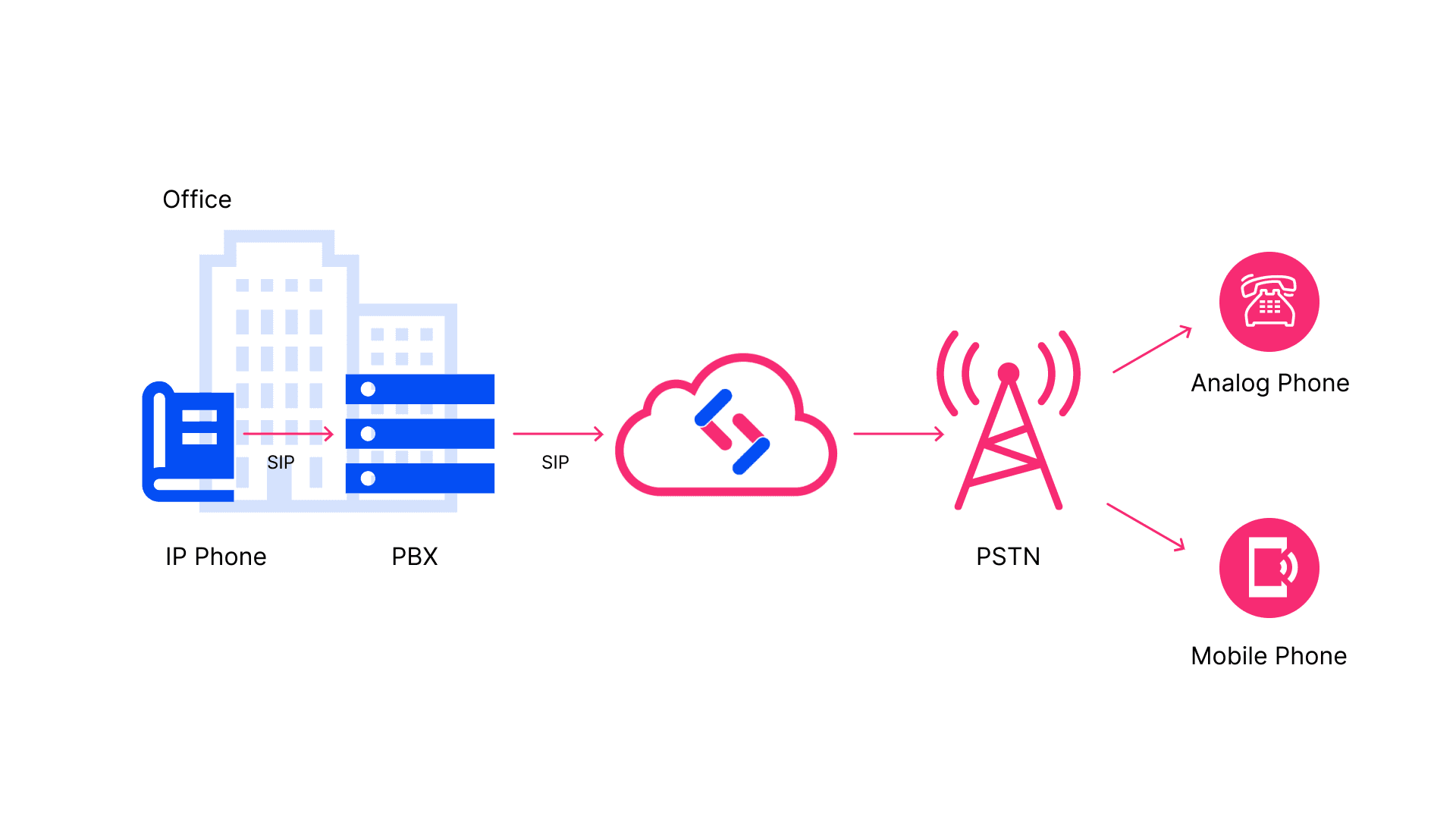
Not too long ago, if a business wanted to provide extensions to each of their employees, they would need to run phone lines to each user and connect all of them to a central physical location. Each business required its own PBX system to route calls internally and externally.
This evolved over time from big and clunky systems to software-defined implementations following the invention of voice communications over the internet (VoIP), and this new era made SIP a reality. Real-time multimedia sessions such as a voice call travel from a PBX to the PSTN through the cloud, as opposed to physical phone lines. Data is instead sent through a SIP trunk, or a virtual phone line.
How to use SIP
You can use SIP via clients or endpoints. A SIP endpoint is a device that makes and receives calls through your gateway. An endpoint could be a physical phone, a softphone app on a computer or a mobile device, or a PBX System.
This not only allows calls to be made to other registered SIP endpoints on the network, but also allows calls to be ‘trunked’ or ‘passed-through’ over a virtual phone line, reaching any phone connected to the PSTN.
What are the benefits of using SIP?
The main benefit to using SIP rather than using a PSTN is the fact that you will not have to cross PRI lines when making or receiving calls. Because a physical connection to a voice provider or phone company is no longer required, you can send data through a SIP trunk.
SIP trunks allow calls to be broken down into digital packets and sent across a network to their final destination, which means you are able to send calls to any phone number worldwide. This comes with many benefits, including:
Lower Communication Costs
Potential for Growth and Scalability
The cost of hardware and labor to expand traditional phone systems can become expensive quickly. Purchasing phones, phone lines, and other costs adds up, but using SIP allows for more affordable scalability.
Flexibility
SIP phone systems allow you to perform certain functions traditional phone systems cannot. This can include identifying a user’s location or availability, managing different sessions, or enabling instant messaging and multimedia conferences.
Ease of Maintenance and Operation
Consolidated Communication Systems
Improved Sound Quality
Using SIP with SignalWire
SignalWire allows you to create, delete, and edit your SIP endpoints directly in your Dashboard or using our APIs, as well as configure them for a variety of codecs and encryption settings. For a simple way to get started, you can head to your dashboard and look for the SIP section in the navigation sidebar.
After selecting the SIP section, you’ll be directed to a SIP Endpoints page. From there, click on the blue "New" button located at the top right to create a new SIP Endpoint, if you already have a SIP endpoint on your account.
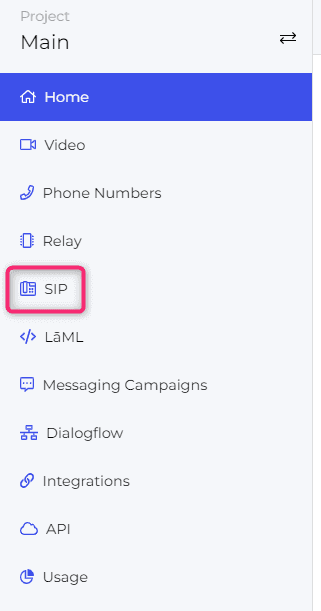
If you do not have a SIP endpoint on your account already, you will need to click on the blue “Create a SIP Endpoint” button located at the bottom of the page.

From here you will need to assign your SIP Endpoint a username, password, and the kind of encryption and codecs you wish to use. Once this is all set, press the blue "Save" button at the bottom. You are now ready to register your SIP Endpoint in a compatible application and start making calls!
To learn how to register a SIP Endpoint with a softphone, check out our guides on how to set up a softphone using one of the many SIP clients we support:
It's important to note that different SIP clients may have slightly different steps for registering your SIP endpoint, so be sure to refer to the documentation for your specific client.
Once you have a softphone registered, you can begin making SIP calls to other SIP Endpoints that are in the same SIP subdomain. To gain the ability to make calls out to PSTN numbers from your SIP endpoint, make sure that your SignalWire account has a PSTN number already, either one you have purchased or one you have verified.
You can then configure your SIP Endpoint to use one of those numbers when placing a call out to a PSTN. If there is no PSTN number to use for a PSTN call, the call will fail due to lack of a PSTN number.
If you have any questions as you set up and begin using SIP, stop by our Discord to connect with our team. If you’d like to learn more about SignalWire’s offerings, or if you have suggestions for other topics you’d like to see covered, please reach out to us at community@signalwire.com.
Frequently asked questions
What does SIP stand for and what is it?
SIP stands for Session Initiation Protocol and is a signaling protocol used to establish, maintain, modify, and end multimedia communication sessions such as voice and video calls over internet protocol (IP) networks.
How does SIP work in VoIP communications?
In VoIP, SIP manages the signaling layer — initiating, modifying, and terminating sessions — while the actual media (audio/video) is transported using media protocols such as the Real-time Transport Protocol (RTP).
What are common SIP use cases?
SIP is widely used to set up VoIP telephone calls, video conferencing sessions, messaging sessions, and multimedia collaboration applications that rely on accurately coordinating communication between endpoints.
Why is SIP important for developers and communications systems?
SIP enables flexible, scalable communications because it decouples signaling from media transport, works across standard IP networks, and integrates with modern telephony systems such as PBXs, SIP trunks, and cloud-based communication platforms.
Related Resources